
How to keep track of Moodle course deadlines and teaching tasks: A teacher’s guide

Balancing teaching delivery with administrative deadlines is one of the most demanding aspects of managing an academic semester. While students focus on assignment due dates, instructors operate under a parallel, often invisible timeline: auditing syllabus resources before term start, tracking grading progress across dozens of essay submissions, and meeting strict grade transmission cutoffs set by examination offices.
Standard learning management systems are architected primarily for institutional record-keeping and student-facing schedules. Moodle’s built-in calendar and notification systems effectively signal class events to enrolled learners, but they offer no native workspace for an educator’s private preparation milestones, grading memos, or recurring course maintenance tasks.
This guide examines how Moodle handles events and notifications natively, explains why teacher-specific workflows fall outside platform tools, and outlines practical frameworks to keep track of course updates, grading deadlines, and private teaching notes across all your active classes.
The dual challenge: Managing grading deadlines and course updates
Managing an academic term requires balancing active classroom delivery with two demanding operational streams: preparing materials before teaching begins and processing student submissions after assignments close. While these commitments define the rhythm of the semester, they rarely align with the student-facing dates displayed on learning platforms, creating persistent scheduling friction for instructors.
The invisible pre-term workload: updating syllabi, broken links, and weekly resources
Long before students log in, educators must complete a substantial volume of preparatory maintenance. Transferring materials from previous terms via course rollover tools provides a foundation, but it leaves dates, external hyperlinks, and syllabus documents out of sync.
Every course shell requires a systematic review: verifying that reading links remain accessible, updating weekly outlines, adjusting assignment submission windows, and testing interactive elements. Because these course content updates are internal preparation steps rather than scheduled course events, they exist without built-in platform reminders. When teachers manage four or five courses simultaneously, tracking which modules have been updated and which still contain outdated materials quickly becomes overwhelming.
Tracking grading progress across large cohorts
Once teaching begins, the operational focus shifts to evaluating student work within tight timeframes. For educators supervising multiple sections or large lecture cohorts, grading rarely occurs in a single sitting; it progresses incrementally over several days or weeks.
A teacher evaluating 45 essay submissions might review ten papers on Tuesday, fifteen on Thursday, and the remainder over the weekend. While Moodle displays the total number of submitted assignments in the grading inbox, it provides no contextual space for an instructor to record a private grading progress memo (such as noting which rubric criteria need standardisation or bookmarking where evaluation paused). Without course-tied tracking, resuming grading across multiple active classes creates continuous mental recalibration.
Strict administrative deadlines: registrar grade submission cutoffs vs student due dates
The most rigid milestone of the semester is not the student submission deadline, but the administrative cutoff for final marks. Academic departments and university registrars enforce non-negotiable grade transmission dates to finalize transcripts, process exam board reviews, and validate student progressions.
Moodle’s core architecture connects assignment deadlines directly to student views, but it does not account for the registrar grade submission date. An assignment scheduled for week twelve might leave the instructor only 72 hours to evaluate dozens of papers and input final marks into the institutional portal. Because institutional platforms lack personal teacher alerts for these administrative thresholds, educators are forced to juggle external calendar tools, sticky notes, or spreadsheets to ensure institutional compliance.
How Moodle handles calendar events and notifications natively
Standard Moodle installations provide built-in scheduling tools designed to coordinate site-wide activities, group milestones, and submission windows across the platform. While these tools serve institutional communication well, analyzing how they operate highlights why an instructor’s private workflow requirements remain largely unaddressed by core LMS features.
The Moodle Calendar block: student-facing activities vs teacher-specific tasks
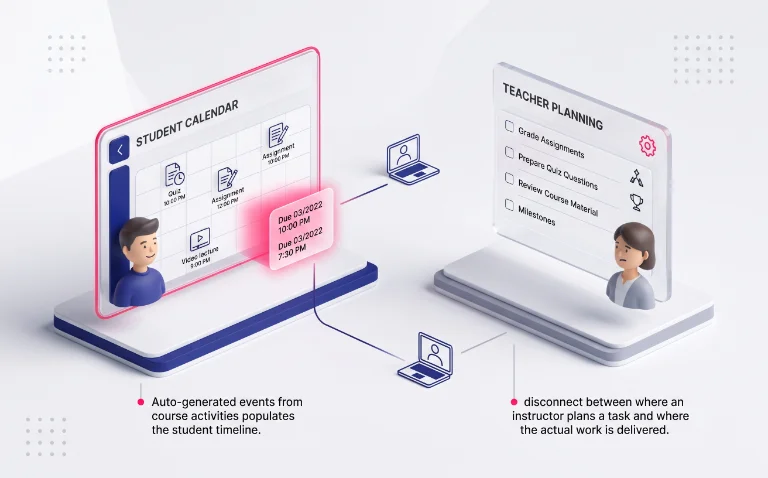
The central scheduling component in standard platforms is the Moodle Calendar block, which automatically aggregates events across site, category, course, and group levels. When a teacher creates an assignment or a quiz with open and close dates, the platform instantly populates those dates on enrolled students’ timelines.
However, the calendar’s data model is fundamentally learner-centric. It is built to display course events, assignment due dates, and institutional announcements rather than individual preparation milestones. While teachers can manually create personal calendar entries, these entries are isolated from the actual course interfaces: they do not attach directly to specific course cards or modules, leaving a disconnect between where an instructor plans a task and where the actual work is delivered.
Why Moodle does not natively remind teachers to update course materials
Moodle’s automated triggers are strictly reactive: they generate events when an activity is created, submitted, or scheduled for closure. The platform contains no native logic to prompt instructors for recurring maintenance, such as an upcoming syllabus revision planning phase or annual resource audits.
Because the LMS cannot predict when an educator needs to refresh lecture slides, review question pools, or replace deprecated external links, no native reminders exist to guide pre-term preparation. When rolling over a previous semester’s course shell, the teacher must manually remember to reconfigure every individual activity setting without system-generated prompts, increasing the likelihood that outdated dates or broken links slip through into the active term.
Notification fatigue: why platform emails and forum digests get overlooked
To keep users informed, Moodle relies on platform notifications and automated email messages, including forum subscription digests, submission receipts, and message alerts.
During peak teaching and grading periods, this automated stream can quickly generate dozens of system emails daily. This constant influx causes acute notification fatigue, leading many educators to filter out platform emails into secondary inbox folders or disable email alerts entirely. When high-volume automated receipts bury critical reminders, relying on standard LMS notifications for time-sensitive grading cutoffs or task milestones becomes increasingly risky.
Strategies for tracking course revisions and grading milestones
Bridging the gap between collective LMS schedules and private teaching responsibilities requires adopting clear tracking habits. Rather than relying on memory or scattered notebooks, instructors benefit from embedding lightweight organizational frameworks directly into their preparation and evaluation routines.
Contextual Notes
Eliminate spatial separation by anchoring private checklists directly to course shells.
Private Checkpoints
Pace the evaluation cycle with personal target dates hidden from learner views.
Batch Quotas
Segment large submission pools into fixed daily units to avoid grading fatigue.
Maintaining contextual to-do notes directly tied to each course space
The primary obstacle in tracking course tasks is spatial separation: reminders kept in a separate notebook or smartphone app are often forgotten during active browsing in the LMS. When moving between multiple tutorial cohorts, an instructor needs immediate context alongside each class.
A reliable workflow relies on private course notes associated with specific spaces. Recording concise checklists, such as “replace week 4 reading PDF” or “verify assignment 2 grading rubric“, ensures that necessary course iterations surface precisely when opening that class. By maintaining notes within direct reach of the course interface, educators eliminate the friction of searching external task managers while preparing materials.
Scheduling personal preparation reminders independent of student visibility
Standard assignment due dates trigger student submissions, but they do not help an instructor pace the resulting evaluation workload. To prevent end-of-term grading bottlenecks, educators must establish personal delivery milestones that remain entirely separate from learner viewports.
Effective planning involves scheduling internal target dates for each major stage of the evaluation cycle. For example, setting an internal reminder for 48 hours after an assignment closes prompts the teacher to perform a quick sample review of submissions and calibrate grading rubrics. These personal checkpoints protect focus during high-pressure evaluation periods, ensuring that grading advances steadily toward the official transmission deadline.
Structuring exam period workflows and grading batches
When hundreds of student submissions arrive simultaneously during midterms or finals, treating the grading inbox as a single undifferentiated queue creates significant mental fatigue. Dividing large evaluation pools into manageable, structured segments restores control over heavy grading cycles.
A structured exam period workflow breaks large cohorts into daily batch quotas (such as reviewing fifteen papers per session) paired with clear completion markers. Logging active status directly, such as noting “Group A: 28/40 completed“, allows teachers to pause and resume grading without recalculating their remaining workload. This systematic pacing reduces assessment stress and ensures consistent grading quality across all student submissions
Integrating task management into your course structure
Setting reminders helps manage peak grading spikes and content updates, but long-term peace of mind comes from an established routine. Discover how to embed your task tracking within an end-to-end Moodle teacher organization system that covers the entire course lifecycle.
Tracking deadlines and update tasks across dozens of unorganized links quickly becomes chaotic. Grouping your active courses into dedicated drag-and-drop Moodle course folders provides a structured visual home for every reminder and course note you create.
The browser-level solution: Course-tied notes and desktop reminders
Moodle’s native calendar is built for class-wide schedules, not for your private preparation, course maintenance, or grading workflow. To keep your personal deadlines front and center without cluttering the LMS, using a dedicated browser companion bridges this operational gap seamlessly.
Sovereign task tracking directly inside your browser side panel
By decoupling personal task management from central server databases, educators gain complete sovereignty over their daily preparation schedule. Private reminders and course notes remain visible exclusively on the instructor’s screen, leaving institutional settings and student views completely untouched.
Installing My Organizer for Moodle adds a persistent, privacy-focused productivity layer directly to your web browser. Operating entirely through secure local storage (chrome.storage.local), it allows you to attach contextual to-do notes to any course and configure Chrome desktop alerts that notify you of critical grading cutoffs—even when Moodle is closed.
Ready to master your Moodle deadlines and course tasks?
You do not need server plugins or external calendar apps to stay ahead of course updates and grading milestones. Take control of your teaching workflow with private notes and custom reminders in your browser side panel.